Marketing Your Listings With YouTube: How Video Can Drive Traffic, Sales, and Ranking Momentum
Most sellers think of Amazon, Walmart.com, and Shopify stores as the entire marketplace. They optimize their listing, run PPC campaigns, adjust pricing, improve images, and wait for internal traffic to do the work.
That matters. But it is not the whole opportunity.
One of the most powerful tools Amazon sellers can use outside of Amazon is YouTube. Not because every seller needs to become a full-time creator, and not because every product needs a viral video. YouTube is powerful because it allows a brand to educate buyers, answer search-driven questions, demonstrate the product, build trust, and then send interested viewers directly to the Amazon listing.
When done properly, YouTube becomes more than a content platform. It becomes a long-term traffic source.
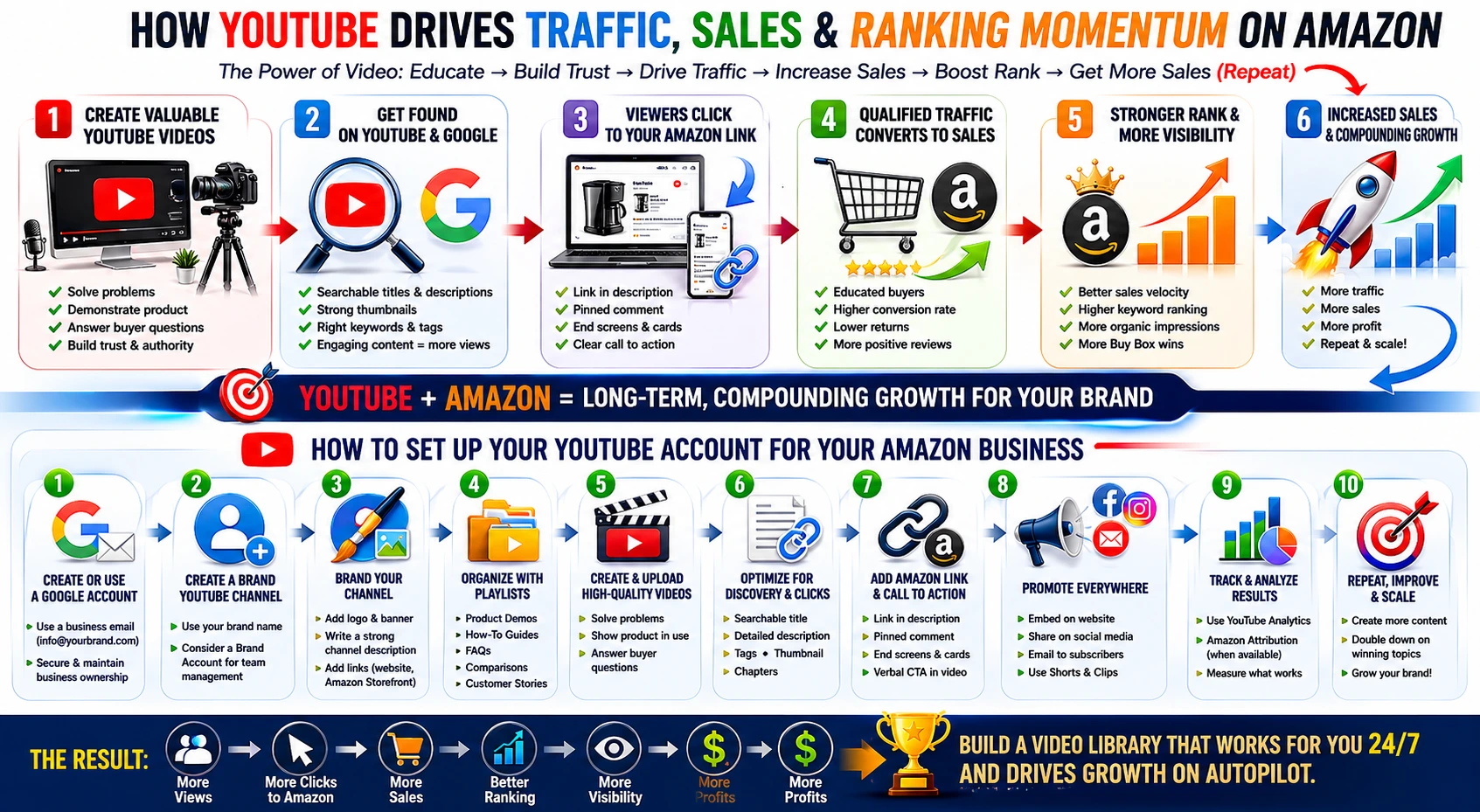
A good YouTube video can keep working for months or years. It can appear in YouTube search, Google search, suggested videos, and embedded website pages. When buyers find the video, learn from it, and click through to Amazon, that external traffic can help create more sessions, more sales, and stronger conversion signals. More sales can support better Amazon performance, and better Amazon performance can lead to more visibility inside Amazon itself.
That is the compounding effect. The video helps create the sale. The sale helps strengthen the listing. A stronger listing can earn more exposure. More exposure can lead to more sales.
Why YouTube Matters for Amazon Sellers
YouTube is not just entertainment. It is one of the largest search engines in the world. People use it to research products, compare options, solve problems, watch demonstrations, and decide what to buy.
For Amazon sellers, this creates a major opportunity.
A shopper may not begin their buying journey on Amazon. They may begin with a search like:
Best knee brace for walking
How to use a cold brew coffee maker
Best storage bins for garage organization
How to install landscape staples
Product review for travel coffee grinder
Before and after using compression socks
How to choose the right size dog harness
These are not just content searches. Many of them are buying-intent searches. The person is trying to solve a problem, compare products, or feel confident before purchasing.
If your video answers that question well, you have a chance to influence the sale before the buyer ever reaches Amazon.
YouTube Builds Trust Before the Amazon Click
Amazon listings are limited. You have images, title, bullet points, A+ Content, reviews, and maybe a product video. Those assets are important, but they often do not provide enough room to explain the full product story.
YouTube gives you more space.
A YouTube video can show the product in use. It can explain the problem the product solves. It can compare your product to alternatives. It can demonstrate size, fit, ingredients, setup, installation, packaging, or common use cases. It can also answer objections that may prevent someone from buying.
That matters because buyers often hesitate when they do not fully understand the product.
They may wonder:
Is this the right size?
Will it work for my situation?
Is it easy to use?
What comes in the box?
How is this different from other products?
Is this worth the price?
Can I trust this brand?
A strong YouTube video can answer those questions in a more natural and convincing way than a listing alone.
How YouTube Traffic Can Help Amazon Sales
YouTube can support Amazon listings in several ways.
First, it can send new shoppers to your product detail page. These are buyers who may not have found you through Amazon search alone.
Second, it can improve buyer confidence. A shopper who watches a helpful video before clicking to Amazon may arrive more educated and more ready to buy.
Third, it can support conversion. If the video has already answered key questions, the Amazon listing does not have to do all the work by itself.
Fourth, it can create long-term discovery. PPC traffic usually stops when the ad budget stops. A YouTube video can continue being found organically.
Fifth, it can help strengthen brand presence. When a buyer sees your product on Amazon, your website, YouTube, Google, and social media, the brand feels more established and credible.
This does not mean YouTube magically guarantees ranking improvement. Amazon ranking is influenced by many factors, including sales, conversion rate, relevance, pricing, inventory, reviews, advertising, and competition. But outside traffic that produces real sales can be valuable because sales activity is one of the clearest signals of customer demand.
The key is not just sending traffic. The key is sending qualified traffic.
The Best Types of YouTube Videos for Amazon Products
Not every product needs the same type of video. The best format depends on the product, the buyer, and the questions shoppers ask before purchasing.
1. Product Demonstration Videos
These videos show the product in use. They are especially useful for tools, home goods, fitness products, kitchen products, pet products, medical support products, electronics, outdoor products, and anything that benefits from visual explanation.
A good demonstration video should show:
What the product is
What problem it solves
How to use it
What comes included
What makes it different
Who it is best for
Where to buy it
2. Problem-Solution Videos
These videos start with the customer’s problem, not the product.
For example:
How to prevent coffee from tasting bitter
How to organize garage shelves
How to protect your heel from pressure sores
How to keep landscape fabric in place
How to reduce clutter in a small kitchen
The product is then introduced as part of the solution. This format works well because it matches how people search when they are trying to solve something.
3. Comparison Videos
Comparison videos are powerful because shoppers often compare before buying.
Examples:
Whole bean vs ground coffee: which should you choose?
K-cups vs bagged coffee: what is best for your routine?
Stainless steel vs plastic storage containers
Manual vs electric coffee grinders
FBA vs FBM for Amazon sellers
For product brands, comparison videos should be honest and useful. The goal is not to attack competitors. The goal is to help the buyer make the right decision and position your product clearly.
4. Frequently Asked Question Videos
Amazon listings often receive the same questions repeatedly. Those questions can become YouTube videos.
Examples:
What size should I order?
Is this dishwasher safe?
Can this be used outdoors?
How long does it last?
Is this compatible with my machine?
How do I install it?
How do I clean it?
These videos can also reduce customer confusion, returns, and negative reviews.
5. Review-Style or Testimonial Videos
If you have legitimate customer stories, case studies, or influencer content, those can become helpful videos. The key is to stay compliant and avoid fake reviews, exaggerated claims, or anything that violates Amazon’s review policies.
A real customer experience, properly disclosed and presented honestly, can be much more convincing than generic product copy.
6. Short-Form Videos
YouTube Shorts can be useful for quick product moments, fast demonstrations, before-and-after clips, quick tips, and simple “watch this product solve a problem” content.
Shorts may not always send as much direct traffic as longer videos, but they can build awareness and create discovery.
What Makes a YouTube Video Searchable?
A YouTube video does not become useful just because it is uploaded. It needs to be built around search intent.
Searchable videos usually have five things working together: the topic, title, thumbnail, description, and content structure.
1. Choose a Searchable Topic
Start with what people are already asking.
Do not begin with “What do we want to say about our product?” Begin with “What is the buyer searching for?”
Good topics usually include:
How to solve a problem
How to use a product
How to choose between options
Mistakes to avoid
Product comparisons
Buyer guides
Setup or installation help
Maintenance or care instructions
A searchable topic might be:
“Best Coffee Pods for a Strong Morning Brew”
That is better than:
“Our New Coffee Pods Are Available Now”
The first one matches buyer intent. The second one sounds like an announcement.
2. Write a Clear Title
The title should explain exactly what the viewer will learn. Avoid clever titles that do not include the main search phrase.
Good titles:
How to Choose the Right Coffee Pods for Your Morning Routine
Whole Bean vs Ground Coffee: Which Is Better for Freshness?
How to Use Landscape Staples to Secure Weed Barrier Fabric
Best Heel Protection Options for Bedridden Patients
How to Organize a Garage With Heavy-Duty Storage Bins
Weak titles:
Our Product Is Finally Here
You Need This
Watch This Before You Buy
The Best Solution Ever
The title should be written for both the viewer and the search engine.
3. Use a Strong Thumbnail
The thumbnail is often what gets the click. It should be simple, readable, and visually clear.
A strong thumbnail usually includes:
The product or problem clearly visible
A short phrase with large readable text
Strong contrast
A human element when possible
A visual before-and-after or comparison
Do not overload the thumbnail with too much text. On mobile, tiny text becomes unreadable.
4. Write a Useful Description
The description should support search and conversion.
A good description includes:
A short summary of the video
The main keyword phrase naturally included
A link to the Amazon product
A link to the brand website if available
Related product links
Timestamps for longer videos
A short disclaimer if needed
A call to action
Example:
“In this video, we explain how to choose the right coffee pods for a stronger, smoother morning brew. We cover roast level, flavor profile, pod compatibility, and what to look for before buying.
Shop the product on Amazon: [Insert Amazon link]
Learn more about the brand: [Insert website link]”
5. Use Tags, But Do Not Rely on Them
Tags can help provide context, especially for alternate spellings, product terms, brand names, and related phrases. But tags are not the main driver of YouTube success. The title, thumbnail, topic, description, and actual viewer engagement matter more.
Use tags like:
Amazon product
product demo
coffee pods
coffee k cups
dark roast coffee
product review
how to use coffee pods
brand name
Do not stuff tags with unrelated keywords. That can hurt trust and relevance.
6. Say the Keywords in the Video
YouTube can understand parts of the video content, including spoken words and captions. If your video is about “how to choose the right coffee pods,” say that phrase naturally in the introduction.
Example:
“In this video, we’re going to show you how to choose the right coffee pods for your morning routine, including roast level, flavor, strength, and compatibility.”
This helps align the title, description, and video content.
The Right Structure for an Amazon Product Video
A good product video should not feel like a long commercial. It should feel helpful.
Here is a simple structure:
Opening: Identify the Problem
Start with the buyer’s need.
“Choosing the right coffee pod can be confusing because roast level, flavor, strength, and machine compatibility all matter.”
Introduce the Product Naturally
Bring in the product as part of the solution.
“In this example, we’re using Nashville Grind coffee pods, which are designed for buyers who want a bold, convenient cup without grinding or measuring coffee.”
Demonstrate the Product
Show the product clearly. Use close-ups. Show packaging. Show what comes in the box. Show it being used in a real setting.
Explain the Key Benefits
Focus on benefits, not just features.
Instead of only saying “24-count box,” explain why that matters.
“This 24-count box gives you a convenient supply for daily use without needing to open a full bag of coffee or grind beans.”
Answer Common Questions
Address the questions buyers usually ask before purchasing.
“Is this compatible with my machine?”
“What does the roast taste like?”
“How strong is it?”
“How many pods come in the box?”
“Is it better for everyday coffee or occasional use?”
Give a Clear Call to Action
Tell viewers what to do next.
“If this looks like the right fit for your morning routine, you can find the Amazon listing through the link in the description.”
Where to Place the Amazon Link
The Amazon link should be easy to find.
Place it:
Near the top of the video description
In a pinned comment
In the channel profile links
In related blog posts on your website
In video chapters or timestamps when appropriate
In the end screen or verbal call to action
The easier you make the next step, the more likely the viewer is to click.
Do not bury the link under a long paragraph. A viewer should not have to hunt for it.
Use Amazon Attribution When Possible
Brands enrolled in Amazon Brand Registry should consider using Amazon Attribution or Brand Referral Bonus tools when available. These tools can help track outside traffic sources, including traffic from YouTube, social media, websites, email, and other marketing channels.
This matters because sellers should not guess whether YouTube is working. They should measure it.
Track:
Clicks from YouTube to Amazon
Detail page views
Add-to-cart activity
Purchases
Conversion rate
Revenue
Bonus eligibility if using Brand Referral Bonus
Which videos drive the best results
Measurement turns YouTube from a content experiment into a real marketing channel.
How YouTube Can Support Amazon Ranking Momentum
Amazon rewards performance. If a listing receives more qualified traffic, converts well, and generates more sales, that can support broader marketplace momentum.
The sequence often looks like this:
A buyer searches YouTube or Google.
They find your product video.
They watch the explanation or demonstration.
They click the Amazon link.
They arrive at the listing already educated.
They purchase.
The sale contributes to listing performance.
Better performance can support stronger visibility.
Stronger visibility can lead to more organic Amazon sales.
This is why YouTube can be so valuable. It does not just create one sale. It can help start a chain reaction.
But the traffic must be relevant. Sending random viewers to Amazon is not the goal. Sending interested buyers is the goal.
How Often Should Amazon Sellers Post on YouTube?
Consistency matters more than volume.
A brand does not need to post daily to benefit from YouTube. A practical starting schedule might be:
One longer product or educational video per month
Two to four Shorts per month
One FAQ video per month
One comparison or buyer guide per quarter
For larger brands, weekly content may make sense. For smaller brands, a focused library of high-quality videos may be enough.
The goal is to build a useful video library around the product category.
A Simple YouTube Content Plan for Amazon Sellers
Here is a basic 10-video plan that most Amazon brands can adapt:
Product overview video
How to use the product
Who the product is best for
Common mistakes buyers make
Product comparison video
Before-and-after or problem-solution video
Frequently asked questions video
Unboxing video
Maintenance, care, or setup video
Customer story or use-case video
Each video should have a specific purpose. Some videos build trust. Some answer questions. Some drive direct clicks. Some support search visibility.
Together, they build a stronger brand presence.
How to Set Up a YouTube Account for Your Business
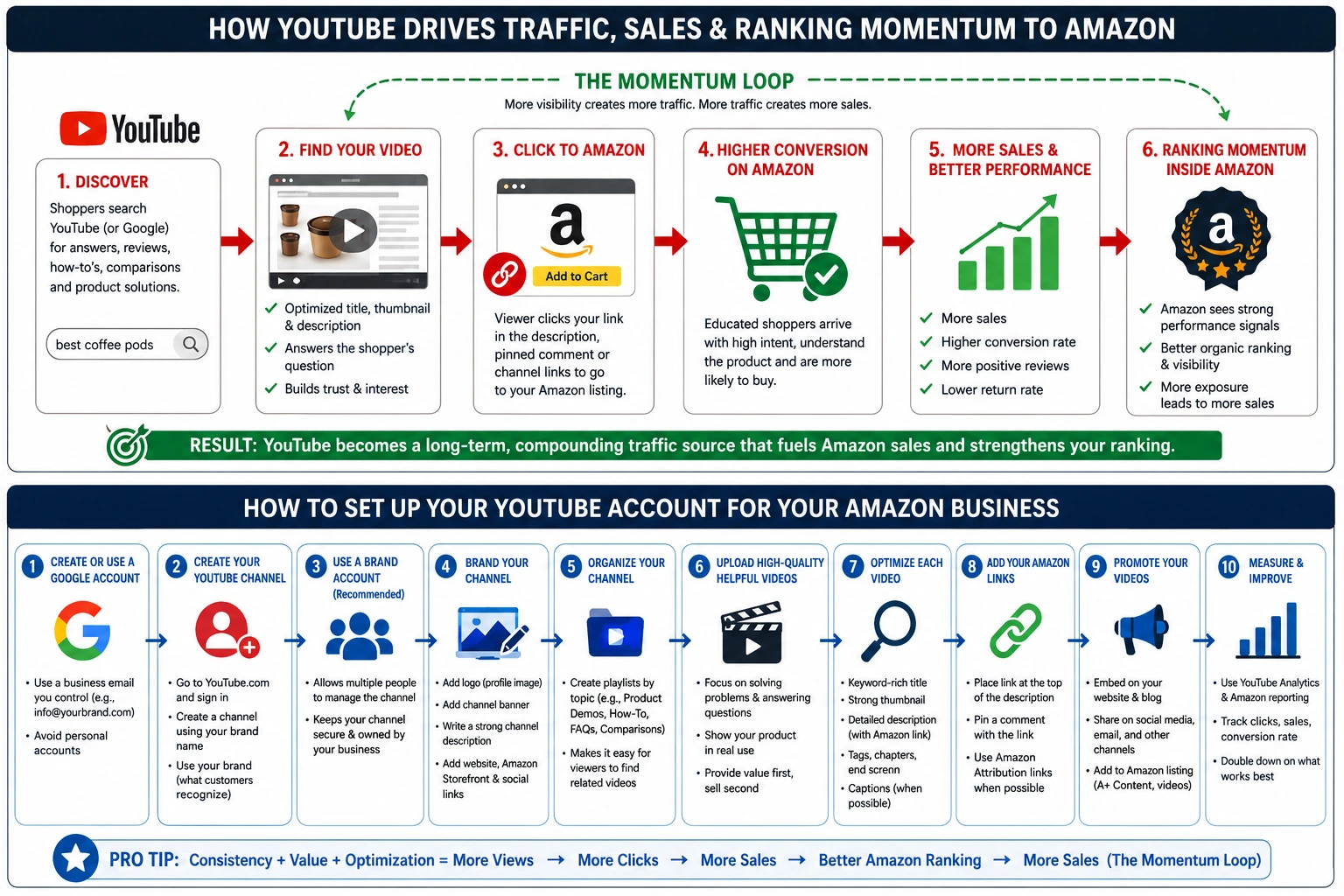
If you have never created a YouTube account for your business, the process is straightforward.
Step 1: Create or Use a Google Account
YouTube is connected to Google. To create a YouTube channel, you need a Google account.
For a business, it is usually better to use a company-controlled Google account rather than an employee’s personal account. This helps avoid ownership problems later.
Use an email that the business controls, such as:
Avoid creating the channel under one person’s personal Gmail unless that is the only option.
Step 2: Create the YouTube Channel
Go to YouTube and sign in. Then create a new channel.
Use the brand name as the channel name. If your Amazon product brand is different from your company name, use the product-facing brand name buyers recognize.
For example:
Good channel name:
Nashville Grind Coffee
Less ideal:
NG Holdings LLC
The channel should be named for the brand customers see on Amazon.
Step 3: Use a Brand Account When Appropriate
A Brand Account is useful because it allows multiple people to manage the channel without sharing one login. That matters for companies because owners, employees, agencies, consultants, or video editors may all need access.
This is important for long-term control. If one person leaves the company, you do not want the YouTube channel locked inside that person’s personal account.
Step 4: Add Channel Branding
Set up the channel professionally before uploading videos.
Add:
Profile image or logo
Channel banner
Business description
Website link
Amazon Storefront link if appropriate
Social media links
Contact email
Clear handle if available
The channel should look like a real business, not an abandoned side project.
Step 5: Write a Strong Channel Description
The channel description should explain who the brand helps, what the products do, and what viewers can expect.
Example:
“Welcome to [Brand Name]. We create practical products designed to help [target customer] solve [main problem]. On this channel, you’ll find product demonstrations, how-to videos, buyer guides, comparisons, and helpful tips so you can choose the right product with confidence.”
Then include links to the brand website and Amazon listings where appropriate.
Step 6: Organize the Channel
Create playlists based on topics.
Examples:
Product Demonstrations
How-To Guides
Buyer Tips
Product Comparisons
Customer Questions
Amazon Product Videos
Shorts
Playlists make the channel easier to navigate and help viewers find related videos.
Step 7: Upload Your First Videos
Start simple. You do not need a Hollywood production.
A clean, useful video filmed with good lighting and clear audio is often better than an overproduced video that says very little.
Your first video should usually be a product overview or product demonstration.
Before publishing, complete:
Video title
Description
Amazon link
Thumbnail
Tags
Playlist
End screen if applicable
Pinned comment with link
Captions or transcript if available
Step 8: Add the Amazon Link Carefully
Use a clean, trackable Amazon link when possible.
If you are using Amazon Attribution, use the attribution link. If not, use the normal Amazon listing URL or Amazon Storefront URL.
The description should clearly state where the link goes.
Example:
“Shop this product on Amazon: [Insert link]”
Do not use misleading links or vague calls to action.
Step 9: Promote the Video
Do not just upload the video and hope people find it.
Use the video in multiple places:
Add it to the Amazon listing if applicable
Embed it on your website
Share it on LinkedIn, Facebook, Instagram, and TikTok
Include it in email campaigns
Send it to customer service teams to answer common questions
Add it to blog posts
Use clips from the video as Shorts or social posts
One good video can become multiple pieces of marketing content.
Step 10: Measure Performance
Use YouTube Analytics and Amazon reporting tools to review what is working.
Watch for:
Views
Watch time
Click-through rate
Average view duration
Comments
Subscriber growth
Link clicks
Amazon sales
Conversion rate
Repeat traffic
The videos that produce the most useful traffic should guide your future content.
Common Mistakes Amazon Sellers Make With YouTube
Mistake 1: Making the Video Too Salesy
Viewers do not want a commercial. They want help. Teach first. Sell second.
Mistake 2: Using Weak Titles
A video called “Product Demo” is not searchable enough. A better title explains the product, problem, or buyer question.
Mistake 3: Forgetting the Link
If the goal is Amazon traffic, the link needs to be easy to find.
Mistake 4: Not Showing the Product Clearly
The product should be visible. Show close-ups. Show scale. Show packaging. Show real use.
Mistake 5: Ignoring the Thumbnail
A weak thumbnail can prevent a good video from getting clicks.
Mistake 6: Creating One Video and Stopping
YouTube works best as a content library. One video can help, but multiple videos covering different buyer questions are much stronger.
Mistake 7: Not Tracking Results
If you are not tracking clicks and sales, you cannot tell whether the strategy is working.
YouTube Is Not a Shortcut, But It Is a Powerful Asset
YouTube will not fix a bad product, a weak Amazon listing, poor reviews, bad pricing, or inventory problems. It is not a replacement for Amazon PPC, listing optimization, or marketplace fundamentals.
But when the product is strong and the listing is built correctly, YouTube can become a serious growth tool.
It helps buyers discover the product.
It teaches them why the product matters.
It answers their questions before they buy.
It sends qualified traffic to Amazon.
It can support sales momentum.
It can help build a stronger brand beyond Amazon.
That is the real value.
Amazon is where the transaction may happen, but YouTube can be where the customer first becomes convinced.
I’d title this page: Marketing Amazon Listings With YouTube: How Video Drives Traffic, Sales, and Ranking Momentum.