
Sending Inventory to Amazon FBA: Case Pack Rules Sellers Need to Understand
Sending inventory into Amazon FBA sounds simple: pack the products, create the shipment, print the labels, and send the boxes to Amazon. But in reality, Amazon has very specific requirements for how inventory must be packed, labeled, and shipped.
For many sellers, especially those working with manufacturers, suppliers, or prep centers, one of the most common ways to send inventory into Amazon is through case-packed shipments. This means each shipping case contains the same product, in the same condition, with the same number of units per case.
When done correctly, case-packed shipments can make the FBA process cleaner, faster, and more predictable. When done incorrectly, they can cause receiving delays, compliance problems, inventory discrepancies, or added prep work at Amazon’s fulfillment centers.
This guide focuses primarily on case-packed FBA shipments, not palletized shipments.
What Is a Case Pack?
A case pack is a box that contains multiple units of the same product. For Amazon FBA purposes, a proper case pack should be consistent and predictable.
For example, if one case contains 24 units of a product, then every case for that same SKU should also contain 24 units. Amazon expects case-packed inventory to be uniform.
A case-packed shipment should generally meet the following conditions:
All units in the case are the same SKU.
All units are in the same condition.
Each case contains the same number of units.
The case was packed consistently, usually by the manufacturer or supplier.
The case can be received efficiently by Amazon because the contents are predictable.
This is different from a mixed-SKU box, where one carton may contain different products, different quantities, or different conditions. Mixed-SKU shipments require more detailed box-content information and are more likely to create receiving complications if not handled correctly.
Amazon FBA Case Pack Quantity Limit
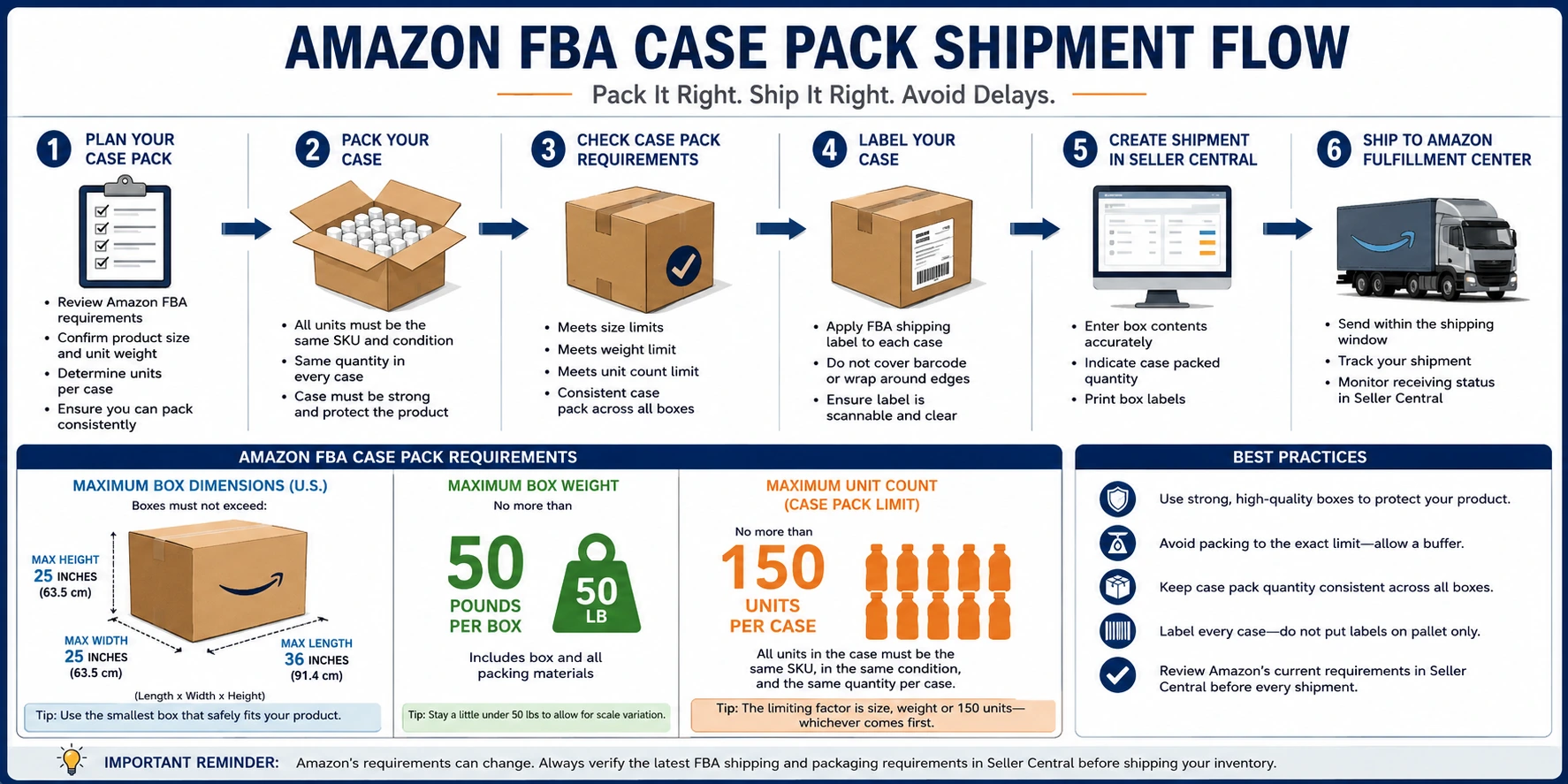
Amazon allows a maximum of 150 units per case pack.
That does not mean every product should be packed 150 units per case. It simply means that 150 units is the upper limit for a case-packed carton.
In many situations, the practical case-pack count will be much lower because the box may hit the size limit, weight limit, or reasonable handling limit before it reaches 150 units.
For example:
A lightweight supplement bottle may fit 48 or 72 units per case.
A bagged product may fit 20 or 30 units per case.
A heavier product may only fit 6, 8, or 12 units per case before reaching the weight limit.
A bulky product may hit the box dimension limit long before it reaches the unit-count limit.
The right case-pack quantity is not just about how many units fit in the box. It has to satisfy Amazon’s rules, carrier requirements, warehouse handling needs, and product protection.
Amazon FBA Box Size Limits
For U.S. FBA small parcel shipments, Amazon’s current maximum box dimensions are:
36 inches long x 25 inches wide x 25 inches high
This is important because some sellers still refer to the older simplified rule of 25 inches on each side. Amazon has since updated the maximum length allowance, but width and height remain limited to 25 inches.
That said, just because Amazon allows a carton up to 36 inches long does not mean every seller should use the largest possible box. Oversized cartons can be harder to handle, more expensive to ship, more likely to get damaged, and more likely to create issues if the product is not packed securely.
A good working rule is this: use the smallest strong carton that safely holds the correct case-pack quantity while staying within Amazon’s limits.
Amazon FBA Box Weight Limit
Amazon’s standard FBA box weight limit is 50 pounds per box.
This is one of the most important rules to follow. If your case exceeds 50 pounds, you should reduce the number of units per case or use a different carton configuration.
There are some exceptions for single oversized units that individually weigh more than 50 pounds, but that is not the normal case-pack scenario. For standard case-packed inventory, plan around the 50-pound maximum.
A good best practice is to stay slightly below the limit. For example, targeting 47 to 49 pounds instead of exactly 50 pounds gives you a cushion for scale differences, packaging variation, moisture, labeling, or supplier measurement errors.
How to Choose the Right Case Pack Quantity
When deciding how many units should go into each master case, sellers should work backward from Amazon’s rules.
Start with these questions:
How large is one sellable unit?
How much does one sellable unit weigh?
How many units fit safely in a carton?
Does that carton stay under the size limit?
Does that carton stay under the 50-pound weight limit?
Does the unit count stay at or below 150 units?
Can the same unit count be repeated consistently across all cases?
For example, if each unit weighs 2 pounds, a 24-unit case would weigh roughly 48 pounds before considering the carton and packing material. That might already be too close to the limit. In that case, reducing the case pack to 20 or 22 units may be safer.
If each unit weighs only a few ounces, the limiting factor may be carton size rather than weight. Even then, the case cannot exceed 150 units if it is being treated as a case pack.
Case Pack Consistency Matters
One of the biggest mistakes sellers make is sending cartons that are almost, but not quite, consistent.
For example:
Box 1 has 24 units.
Box 2 has 24 units.
Box 3 has 21 units.
Box 4 has 24 units.
That creates a problem if the shipment is set up as case-packed inventory. Amazon expects each case for that SKU to contain the same quantity.
If the final carton has a different quantity, it may need to be treated differently in the shipment workflow. Do not force an inconsistent box into a case-pack template just because it is convenient. That is how receiving problems happen.
If you have leftover units that do not fill a complete case, you may need to create a separate box configuration or handle that box as an individual-product shipment, depending on how the shipment is being created in Seller Central.
Master Cases vs. Inner Cases
Sellers also need to be careful with the language used by manufacturers.
Many suppliers use terms like:
Inner carton
Master carton
Outer carton
Case pack
Export carton
These terms are not always used the same way Amazon uses them.
For Amazon FBA, the key question is: What box is Amazon receiving as the case pack?
If a large master carton contains several smaller inner cases, Amazon may not treat the outer master carton as the case pack. The proper case-pack level may be the smaller inner case, especially if the master carton contains multiple case packs inside it.
This matters because the case-pack limit applies to the case Amazon is receiving and processing as a case pack. Sellers should make sure the carton structure matches the shipment setup in Seller Central.
Labeling Requirements for FBA Case Packs
Each sellable unit must be properly identified according to Amazon’s labeling requirements. Depending on the product and account settings, that may mean using the manufacturer barcode or an Amazon FNSKU label.
In addition, each shipping box going into FBA needs the correct FBA box label generated through the shipment workflow.
Do not place the FBA shipping box label only on the pallet, only on the outside wrap, or only on one case when multiple cases are being shipped. Each case needs its own correct label.
Labels should be:
Clear and scannable.
Placed on a flat surface.
Not wrapped around corners or seams.
Not covered by tape.
Matched to the correct box contents.
Applied after the final box configuration is confirmed.
A labeling mistake can cause delays even when the products themselves are packed correctly.
Product Protection Still Comes First
Amazon’s rules are the minimum standard. They do not replace common sense packaging.
The case must be strong enough to protect the product through transportation, carrier handling, Amazon receiving, and warehouse movement.
Use cartons that are appropriate for the weight and fragility of the product. Avoid weak boxes, overfilled cartons, loose contents, or packaging that allows units to shift excessively during transit.
If the product can leak, break, expire, melt, dent, scratch, or become unsellable due to poor packaging, the seller is still responsible for that outcome.
For products with expiration dates, lot numbers, fragile components, liquids, glass, sharp edges, poly bags, bundles, or special prep requirements, make sure those requirements are handled before the inventory arrives at Amazon.
Common Case Pack Mistakes
Here are some of the most common errors sellers make when sending case-packed inventory into Amazon FBA:
1. Exceeding the 50-pound weight limit
This is especially common when suppliers try to maximize carton efficiency. A carton that is cheaper for the factory may not be compliant for Amazon.
2. Using cartons that are too large
Even if a box is accepted by a carrier, that does not mean it meets Amazon’s FBA requirements.
3. Packing more than 150 units in a case
Amazon’s case-pack limit is 150 units per case. Do not assume that a lightweight product can exceed that limit just because it physically fits in the carton.
4. Mixing SKUs in a case-packed box
A case-packed box should contain one SKU in one condition. If you are mixing products, it should not be treated as a standard case pack.
5. Inconsistent unit counts
If one case contains 24 units, every case for that same case-pack configuration should contain 24 units.
6. Confusing master cartons with case packs
If a master carton contains multiple inner cases, confirm which level is being sent and declared to Amazon.
7. Incorrect or missing labels
Even a perfectly packed shipment can be delayed if the box labels or product labels are wrong.
Best Practices Before You Ship
Before sending case-packed inventory into Amazon FBA, confirm the following:
The carton does not exceed Amazon’s current box dimension limits.
The carton does not exceed 50 pounds.
The case contains no more than 150 units.
Each case contains the same SKU and condition.
Each case contains the same unit quantity.
Product labels are correct.
Box labels are correct.
The shipment plan matches the actual carton contents.
The supplier or prep center understands Amazon’s requirements.
You have verified the current rules inside Seller Central before shipping.
This last point is important. Amazon’s requirements can change, and Seller Central should always be treated as the final source of truth before inventory is shipped.
Final Thoughts
Case-packed shipments can make FBA inventory management much easier when they are set up correctly. They create consistency, simplify shipment creation, and help Amazon receive inventory more efficiently.
But sellers should not treat case packing as simply “put as many units as possible into a box.” The correct case-pack quantity must account for Amazon’s size limits, weight limits, 150-unit case-pack limit, labeling requirements, and the physical protection of the product.
The best approach is to set clear carton specifications before production or before your supplier packs the shipment. Confirm the units per case, carton dimensions, carton weight, labeling requirements, and shipment setup before the inventory leaves the warehouse.
A few minutes of planning before shipping can prevent weeks of delays, misplaced inventory, unexpected fees, or compliance problems once the shipment reaches Amazon.